HapNav: Giving Touch a Sense of Distance
A white cane is a brilliant piece of technology. It's cheap, reliable, and it has worked for over a century. But its reach is about a meter, it only tells you about the ground right in front of your feet, and it says nothing about the chest-high table edge, the half-open cupboard door, or the branch hanging at head height. HapNav started as an attempt to fill in those gaps without reaching for the obvious heavy hammer.
The instinct most people have is to point a camera and a neural network at the problem. I wanted to avoid that. A camera-and-model approach needs real compute, drains batteries, adds latency, and fails in ways that are hard to predict, and for something a person leans on for their safety while walking, "usually right" isn't good enough. So we asked a narrower question instead: how far can you get with simple, fast, deterministic distance sensing and a genuinely thoughtful way of communicating it? No machine learning, no camera. Just geometry, a bit of physics, and a careful conversation between the device and the person wearing it.
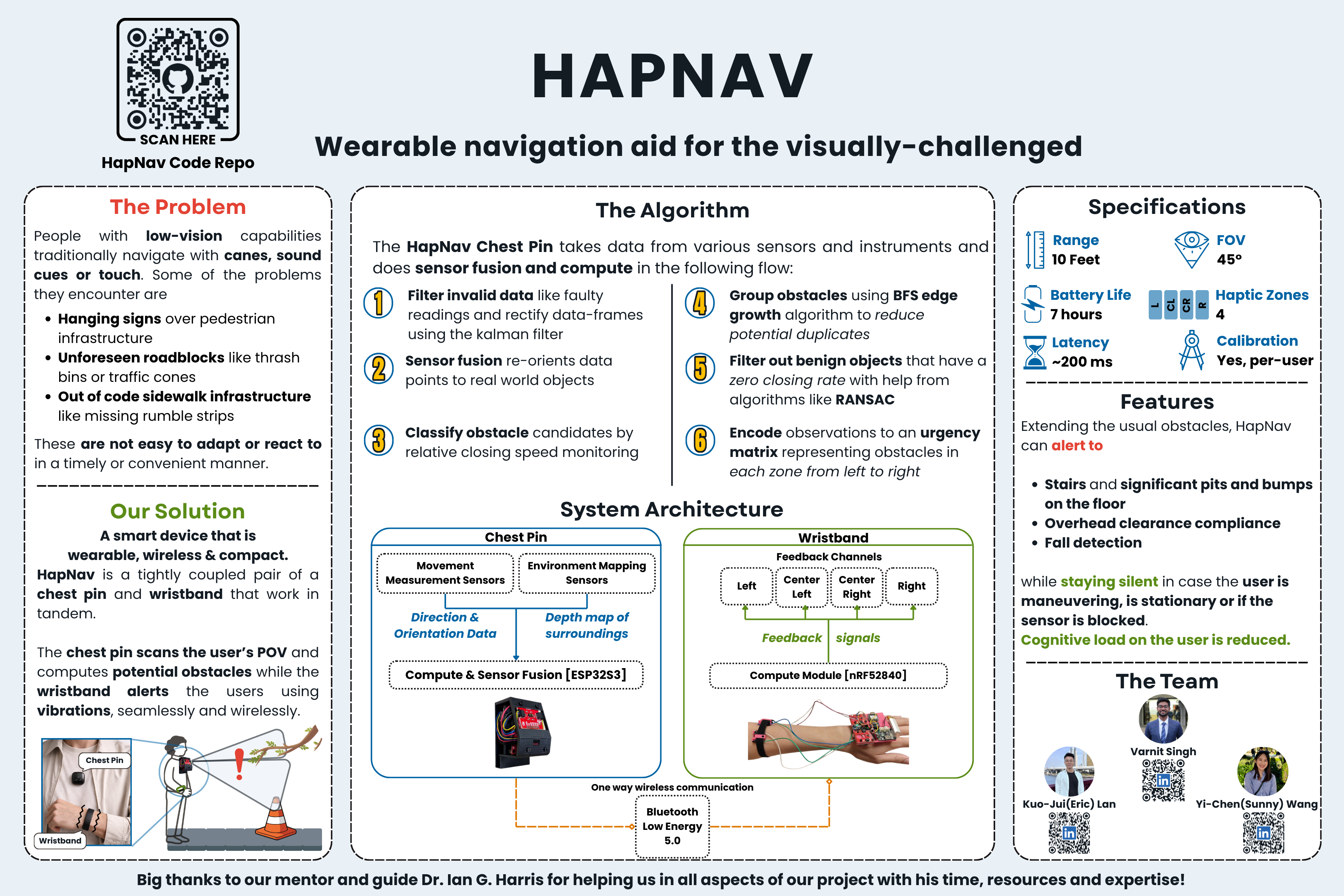
What came out of that is two small boards that talk to each other over Bluetooth. A pin worn on the chest does the sensing and the thinking; a wristband does the talking, through gentle taps on the skin. A tap on the left means something is on your left; a stronger, faster tap means it's close. The clever part is what the pin chooses not to alert for to reduce the sensory load on the user but we shall get there after a brief on how the system works.
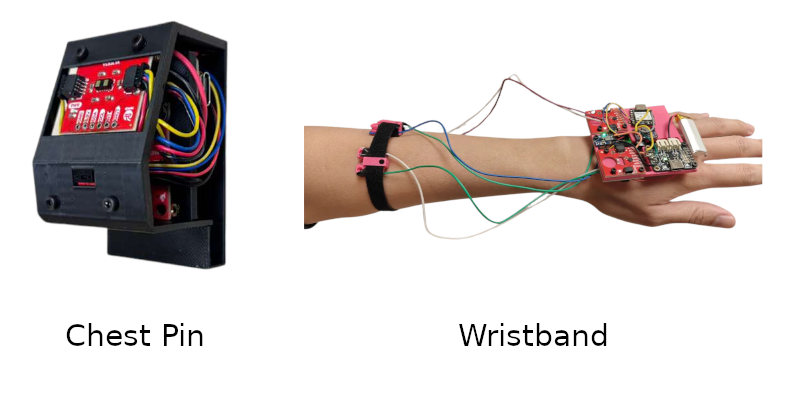
Here are the first prototypes we built to test the core sensing and feedback loop. Both devices underwent significant hardware changes after this, but the basic idea of "chest does the sensing and thinking, wrist does the talking" stayed the same.
How it works
Splitting the system into a sensing unit and a feedback unit let each half be good at one thing. The chest pin runs all the obstacle logic and decides, every cycle, what the user actually needs to feel. The wristband is deliberately dumb. It receives a compact summary of how urgent something is and which direction it's in, and renders that as vibration. Four small motors sit around the wrist, mapped to left, center-left, center-right and right, so you feel direction spatially instead of having to decode it.
Most obstacle-avoidance gadgets only look straight ahead. We deliberately covered the vertical axis too, because that's exactly where a cane falls short. The pin carries three distance sensors aimed differently: a forward one looking slightly down for walls, furniture and people; an upward one tilted about 20° for head-level hazards like low doorframes and branches; and a downward one tilted about 45° to catch drop-offs and steps before your foot finds them. The forward sensor is the interesting one. Instead of a single reading it returns an 8×8 grid of depths, 64 measurements at once, giving the pin a coarse depth image of what's ahead without ever being a camera. Nothing in that data could identify a face or read a screen. Rather, it's just distances.
Raw distances aren't useful on their own, so each frame runs through a short pipeline. A 9-axis motion sensor tells the pin how it's tilted, so the system always knows which way is really down, not just relative to a chest that's leaning or turning. Once gravity is known, the rays hitting the floor or ceiling can be classified and thrown away, leaving genuine obstacles at body height. What remains gets sorted into the four directional zones, and each zone is given an urgency based on how close the nearest thing is and how fast it's closing in.
The step I'm proudest of is the one that decides whether to bother the user at all. Early versions buzzed at everything in range, so a stationary wall or the desk you were sitting at would nag forever. It was technically working and completely unusable. The fix was to make the device reason about change rather than presence. If an obstacle stays at roughly the same distance, its alert fades to silence over a couple of seconds; move relative to it again and the alert comes back. Cheap distance sensors are also noisy at the edges of their range, flickering between valid and invalid frame to frame, so we added a small confidence filter: the system has to see something consistently for a few frames before it reacts, and lose it consistently before it goes quiet. That killed a whole class of phantom buzzes. The taps themselves are graded, short distinct knocks whose strength scales with proximity, which are far easier to place and far less tiring than a constant hum. The drop-off detector follows the same idea. Instead of comparing the ground to a fixed expectation, it tracks a slow-moving baseline of where the floor should be and only fires when a reading jumps clear of it, so gentle ramps are ignored but a missing step triggers instantly.
Under the hood
The chest pin is built around a Seeed XIAO ESP32-S3, which acts as both the Bluetooth host and the sensor brain. Its sensors — the forward grid, the up and down rangefinders, and the motion sensor — all share a single I2C bus through a multiplexer, so four devices that would otherwise fight over the same address coexist peacefully. The wristband runs on a Seeed XIAO nRF52840 driving four haptic chips, each tuned to a coin-style vibration motor through its own channel of a second multiplexer. Both boards run Zephyr RTOS, which gave us proper drivers, a device tree to describe the hardware, and predictable timing, which matters when the whole pitch is "fast and deterministic." There's no AI anywhere in the stack and every behavior is hand-written logic tuned by hand on hardware we wired ourselves, and that's part of why the demo runs the same way every single time. The sensing loop is quick enough that a change in front of you shows up at your wrist in well under a tenth of a second, below the point where it would start to feel laggy.
The thing this project really taught me is that hardware bugs are a different kind of difficult. When software misbehaves you can read it, log it, step through it. When hardware misbehaves the failure could be your code, your wiring, your power supply, a marginal solder joint, or a genuine quirk of one chip, and the symptom often looks the same no matter the cause. We lost days to things like a sensor bus that would silently lock up, and a motion sensor that came back fine after a full power cycle but refused to respond after a plain reset. The only way through was slow, scientific isolation: change one variable, look, repeat. Probe the voltage, swap the cable, re-read the datasheet line by line, add logging that tells you which component failed and when. None of that shows up in the final demo, which is exactly the point. The device just working on the EXPO floor was the sum of a hundred small problems quietly solved.
What's next
HapNav is a prototype, and an honest one. The range and tuning are calibrated for controlled conditions, the enclosure is early, and there's a long road between a working demo and something a person would trust on a real sidewalk. The single-zone up and down sensors are the obvious next upgrade; swapping them for full multi-zone grids would turn "something is up there" into "something is up there, and here's where." But the core idea held up under real scrutiny from real people: you don't always need the biggest hammer. A handful of cheap sensors, solid geometry, and a real respect for the user's attention go a remarkably long way.
HapNav was built over two quarters at UC Irvine. Huge thanks to my teammates Eric Lan and Sunny Wang, and to our mentor Dr. Harris, who helped take this from an idea to a working prototype on the EXPO floor.
Source code for the project is available on GitHub
Below is the expo poster for HapNav just for fun, because I made it myself and I'm proud of it. It was a blast to design and a great way to communicate the project at the EXPO without needing to talk through the whole thing every time.